Revolutionising Field Service Dispatch: Why Your Team Needs the 'Smart View' Diary
For any field service business, the dispatch desk is the beating heart of your daily operations. However, as your workforce grows, traditional calendars, spreadsheets, and whiteboard schedules rapidly break down. Jobs get lost, engineers get double-booked, and dispatchers suffer from "screen fatigue" trying to decipher overlapping appointments.
Enter the Smart View Diary a purpose-built scheduling module designed specifically for the complex, fast-moving realities of field service management. It does not just show you time slots; it actively helps your coordinators make smarter, faster dispatch decisions while maintaining total synchronisation with your field engineers.
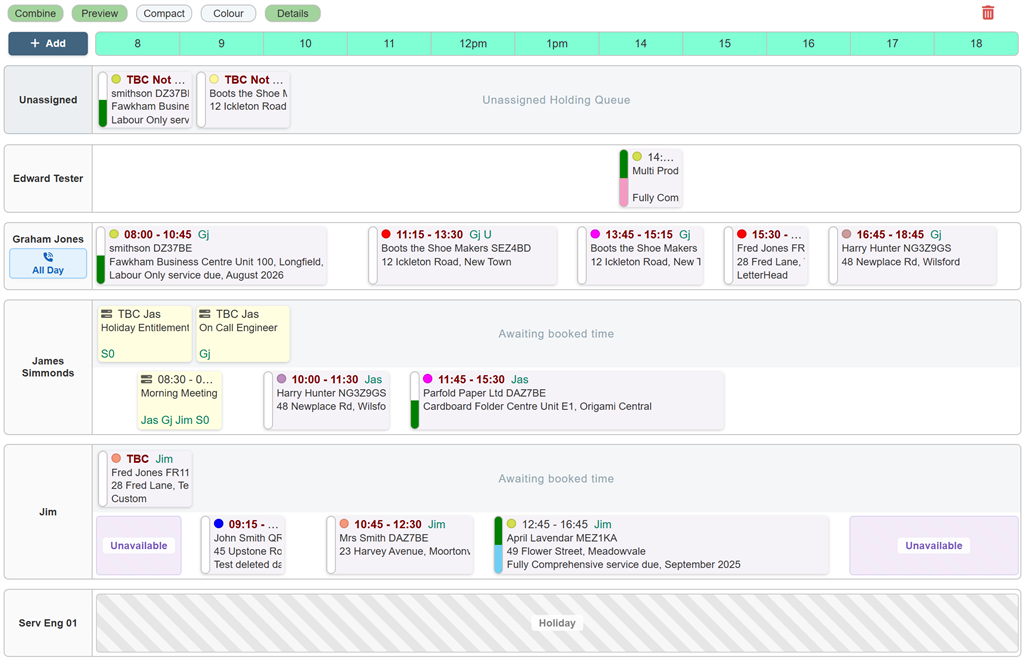
Intelligent, Chaos-Free Scheduling
Unlike standard calendars where concurrent jobs hide behind one another, the Smart View timeline utilises an intelligent lane system. If jobs overlap, the grid automatically expands into distinct tracks, ensuring 100% visibility of every single booking.
With seamless drag-and-drop functionality, dispatchers can effortlessly reallocate visits between engineers, extend job durations with a quick resize, or move tasks across the week. Crucially, the interface is completely customisable. Coordinators can toggle between high-density Compact Mode, swap between detailed address data or job notes, and switch on Full Colour Mode to instantly categorise work by job type or engineer profile, drastically reducing visual fatigue.
Never Lose Track of a Job Again
One of the biggest leaks in field service revenue is the "lost job" work that gets logged but never scheduled. The Smart View eliminates this entirely through dedicated holding areas:
- The Unassigned Queue: A global drop zone for fresh work that hasn't been given to an engineer yet.
- The TBC Queue: Individual holding areas for each engineer, perfect for staging jobs that belong to a specific person but haven't been locked into a firm time slot.
When you are ready, simply drag a job from the queue directly onto the timeline. The system instantly snaps it to the correct time, ready for the engineer to action.
Automated Clash Prevention
Human error happens, but the Smart View catches it before it impacts your customers. If a dispatcher attempts to drop a job onto an engineer who is already booked, scheduled for a holiday, or outside their contracted working hours, the system immediately intervenes. Depending on your company rules, it will either issue a prominent warning or enforce a Hard Block, completely preventing the double-booking.
Live Field Sync & Accountability
Dispatching isn't a one-way street; it requires constant feedback from the field. The Smart View diary bridges the gap between the office and the mobile app with real-time visual indicators:
- Live Status Pills: Every job tile features a dynamic dual-colour indicator. At a single glance, your office team can see if an engineer has accepted the job on their device, and exactly what stage they are at (Travelling, On-Site, Complete, or No-Show). You can track live progress without ever having to pick up the phone.
- Traceability Locks: Compliance and accountability are paramount. Once an engineer actively 'Accepts' or 'Rejects' a job, that booking is locked on the grid. It cannot be accidentally deleted or dragged to another user, ensuring an unbroken chain of traceability from the office to the field.
- Instant On-Call Visibility: Out-of-hours coverage is flagged instantly. Engineers on a call-out rota display a highly visible blue On-Call badge directly beneath their name, displaying their exact shift hours. This keeps the main timeline clear for daytime work while ensuring emergency responders are always identifiable.
Ready to Transform Your Dispatch Operations?
Your coordinators shouldn't be fighting with clunky software; they should be optimising your workforce, reducing travel time, and improving customer satisfaction. The Smart View diary provides the perfect balance of visual clarity, automated error prevention, and live field connectivity.
Stop guessing and start dispatching with confidence. Contact our team today to schedule a live demonstration and see the Smart View in action.
If you would like to know more about AutoVu and what we can do to help your business, why not check out our Frequently Asked Questions page, or Contact Us any time to discuss your specific requirements.